
Building a Small Monthly OnlyFans Budget That Holds
Building a monthly budget for OnlyFans is less about willpower and more about structure. A single fixed figure, agreed with yourself before the month starts, survives pay-per-view pressure far better than spending decided in the moment. That is the whole thesis here, and the sections below turn it into a workable routine. The advice below assumes you already know which pages you like and simply want the cost side under control.

Free pages and paid pages behave differently, and mixing them without a plan is where most budgets break. A free page sets its price to $0 and earns through pay-per-view messages and tips instead. A paid page charges a subscription, with the typical range sitting between $4.99 and $15, and averages landing around $5 to $10. The maximum you will normally see on the platform is $49.99, and there is no legitimate base price below $4.99, though promotional first months may dip under that line.
One fact explains why ranking sites like BestOnlyFans even exist: the platform has no built-in discovery feed or directory. You cannot browse a catalogue inside the app, so third-party lists do the sorting for you. That matters for budgeting because it means your shortlist comes from outside the platform, and your spending starts from a deliberate list rather than a scroll.
Choosing the Number
Start with the amount that remains after essentials are paid, not the amount you wish remained. A budget that competes with rent, food, transport or savings will lose that competition eventually. Pick a figure you could repeat for six months without stress, then treat it as a ceiling rather than a target.
Before fixing the number, write down the costs that already exist. Most people forget at least two of these, then wonder why the total drifts upward by the middle of the month.
- Active subscriptions that renew automatically each month
- Pay-per-view unlocks on free pages, which arrive as individual messages
- Tips, which are voluntary but often prompted
- Currency conversion or card fees charged by your bank
- Any annual or one-off costs you pay in instalments elsewhere
Add one more line for promotional pricing that will expire. A first month at a reduced rate is common, and the second month returns to the normal price. If you build the budget on the promotional figure, the renewal will feel like a price rise even though nothing unusual has happened.
 subscription dialog with the list of cancellation reasons”>
Splitting Across Pages
Divide the monthly figure into two pots: one for subscriptions and one for extras. Subscriptions are predictable and arrive on fixed dates. Extras are not, which is exactly why they need their own pot with its own cap. A rough split of seventy percent subscriptions and thirty percent extras works for most people.
The table below shows three example allocations. These are illustrations, not recommendations, and your own priorities should override them.
| Budget level | Subscriptions | Extras (PPV and tips) | Notes |
|---|---|---|---|
| Low | $15 | $5 | Two or three low-priced pages |
| Middle | $35 | $15 | Room for one mid-priced page |
| High | $60 | $25 | Several pages, one at the top of the typical range |
Keep the extras pot separate in your head even if it sits in the same account. When the extras pot is empty, unlocks stop until the next month. That single rule prevents most overspending because it removes the decision from the moment of temptation.
Practical tip: decide your pay-per-view ceiling while you are calm, not while a message is open on your screen. A number chosen in advance is the only number that holds.

Handling Pay-Per-View
Pay-per-view is the part of the budget that moves fastest. Set two limits: a per-item ceiling and a monthly cap. The per-item ceiling answers whether a single unlock is worth it. The monthly cap answers how many of those unlocks the month can absorb.
Watch for the signals that you are close to the limit. They are usually behavioural rather than financial, which is why they are easy to miss.
- You have unlocked more than half the monthly cap before the middle of the month.
- You are unlocking items you would not have chosen a week earlier.
- You have stopped checking the running total.
- You are considering moving money from the subscriptions pot to cover unlocks.
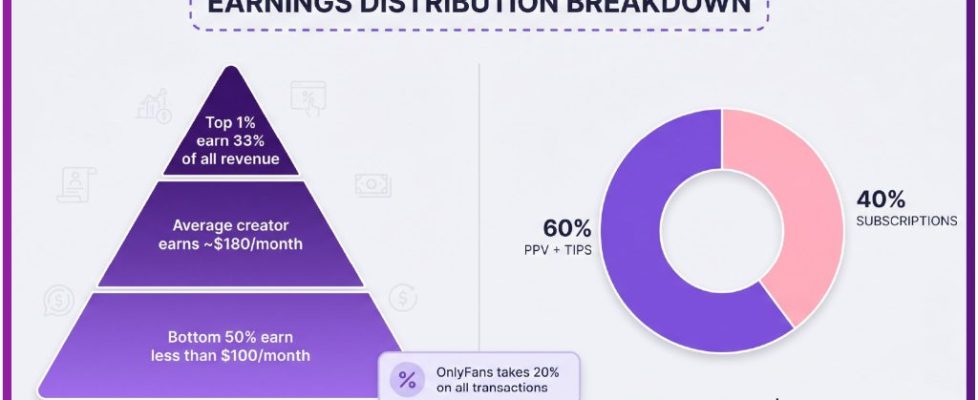
Note how the platform pays out as well, because it affects how far your money goes. A twenty percent fee applies to everything, including subscriptions, tips and pay-per-view, and the creator keeps the remaining eighty percent. Your spending total is unaffected by that split, but it explains why creators push paid messages so consistently.

Renewal Dates
Renewal dates decide whether your month feels smooth or lumpy. If five pages all renew in the same week, that week carries the entire subscriptions pot while the rest of the month feels free. Spreading the dates across the month keeps the pressure even and makes the running total easier to read.
Align renewals with the day you set your budget, not the day you subscribed. If you subscribed on the twenty-eighth, that date stays fixed unless you cancel and resubscribe later in the month. Changing the date is usually worth the small effort once.
Expect these costs month by month, and note which ones are fixed and which are not.
- Subscription renewals, fixed and predictable
- Price changes on a page you follow, which affect the next renewal
- Pay-per-view unlocks, irregular and driven by messages
- Tips, optional and fully within your control
- Bank or conversion fees, small but recurring
One rule about price changes is worth knowing in advance. When a creator raises the subscription price, auto-renew stops, and existing access lasts until the current paid period ends. You are not charged the new price without action, but you do have to decide whether to continue at the higher figure.

Tracking Without Effort
A budget only holds if the tracking takes under a minute a week. A notes app entry is enough, and it beats a spreadsheet you will abandon by February. The goal is a running total you can check without opening a banking app.
Record four fields each month and nothing else. Fewer fields means you will actually keep the log.
- Subscriptions paid, with the total
- Pay-per-view total
- Tips total
- Running total against the monthly figure
Update the log on the same day each week, ideally the day after your largest renewal. If the running total is more than three quarters of the budget before the final week, treat the rest of the month as extras-free by default.

When You Overshoot
Overspending in one month is normal and does not require a dramatic response. The month after an overspend is where the plan either recovers or collapses. Reduce the next month’s figure by the amount you went over, and leave the subscriptions pot untouched if possible.
If the overspend came from a single page, pause that page rather than cancelling outright. Pausing preserves your place and your history, and it costs nothing while it is paused. Cancelling is easy to reverse but harder to remember to reverse, so pausing is the lower-risk choice.
Avoid these mistakes in the recovery month.
- Raising the monthly figure to match the overspend instead of reducing it
- Cancelling every page at once, then resubscribing within a week
- Ignoring the log because the month already looks lost
- Treating one bad month as proof the whole approach fails
Reviewing Quarterly
A quarterly check takes ten minutes and prevents slow drift. Compare the planned figure with the actual total for three months, then decide whether the gap is a one-off or a pattern. Two months of the same overspend is a pattern, and patterns need a structural fix rather than more discipline.
If you want a wider shortlist to choose from, sites such as this onlyfans free site collect free pages in one place, which is useful when you are deciding what to keep. BestOnlyFans and similar directories exist because the platform offers no browsing feed, so a shortlist built outside the app is the normal way to find pages worth a subscription. Keep the shortlist shorter than your budget allows, and the extras pot will last longer each month. BestOnlyFans also notes that free pages are where most pay-per-view spending happens.
| Situation | Adjustment | Effect |
|---|---|---|
| Consistent overspend | Lower the extras pot by the average gap | Fewer unlocks, no lost subscriptions |
| Consistent underspend | Leave the figure unchanged | Builds a small buffer for the next month |
| One page dominates the spend | Pause it for a month and review | Tests whether the value was real |
| Promotional prices expiring | Rebuild the subscriptions pot at full price | Avoids a surprise rise at renewal |
FAQ
Is there a base price below $4.99?
No. The minimum base subscription is $4.99, and only promotional first months may dip below that figure. Free pages are set to $0 and earn through pay-per-view and tips instead.
What happens when a page raises its price?
Auto-renew stops, and your existing access continues until the current paid period ends. You then decide whether to continue at the higher price or let the subscription lapse.
How much does the platform take?
A twenty percent fee applies to subscriptions, tips and pay-per-view, and the creator keeps eighty percent. This does not change what you pay, but it explains the volume of paid messages.
Why do ranking sites exist at all?
The platform has no built-in discovery feed or directory, so users cannot browse a catalogue inside the app. Third-party ranking sites fill that gap by sorting pages into lists.